SignalR 的學習與應用(2):聊天室的小房間
SignalR Groups 簡介
延續上一篇文章介紹的 SignalR 聊天室概念,這次要來聊聊「小房間」功能。如果你熟悉 Discord,可以把 SignalR Groups 想像成 Discord 的語音或文字頻道,每個頻道就是一個 Group,使用者可以進出不同的頻道來交流。 SignalR 的 Groups 讓我們可以把連接的使用者分成不同的「小房間」,用來實現群組聊天、特定用戶廣播等功能。每個使用者可以同時在多個房間裡,這讓訊息傳遞變得很彈性。
Groups 主要特點
- 動態管理:你可以隨時讓使用者加入或退出房間,像是隨時加入或離開 Discord 頻道一樣。
- 臨時性:房間成員資料只存在伺服器記憶體裡,伺服器重啟後就會清空,不用擔心長期維護。
- 廣播效率:可以一次把訊息發給整個房間的人,不需要重複發送。
- 多組成員:同一個使用者可以同時待在很多房間,就像你可以加入好幾個 Discord 頻道一樣。
實作步驟
1. 服務器端實現
using Microsoft.AspNetCore.SignalR;

namespace WebApiDemo.Hubs;

public class ChatHub : Hub
{
    // 使用 Dictionary 追踪用戶所在的房間
    private static readonly Dictionary<string, string> UserRooms = new();
    private static readonly string[] SensitiveWords = new[] { "討厭", "笨蛋", "白痴" };

    // 加入房間的方法
    public async Task JoinRoom(string user, string roomName)
    {
        // 檢查用戶是否已在其他房間
        if (UserRooms.TryGetValue(Context.ConnectionId, out string? oldRoom))
        {
            // 從舊房間移除
            await Groups.RemoveFromGroupAsync(Context.ConnectionId, oldRoom);
            // 通知舊房間的其他用戶
            await Clients.Group(oldRoom).SendAsync("ReceiveSystemMessage",
                $"用戶 {user} 離開了房間");
        }

        // 將用戶加入新房間
        await Groups.AddToGroupAsync(Context.ConnectionId, roomName);
        // 更新用戶房間記錄
        UserRooms[Context.ConnectionId] = roomName;
        // 通知新房間的所有用戶
        await Clients.Group(roomName).SendAsync("ReceiveSystemMessage",
            $"用戶 {user} 加入了房間");
    }

    public async Task SendMessage(string user, string message)
    {
        if (ContainsSensitiveWords(message, out string foundWord))
        {
            await Clients.Caller.SendAsync("ReceiveSystemMessage",
                $"消息包含敏感詞「{foundWord}」,已被攔截");
            return;
        }

        // 檢查用戶所在的房間
        if (UserRooms.TryGetValue(Context.ConnectionId, out string? room))
        {
            // 只向同一房間的用戶發送消息
            await Clients.Group(room).SendAsync("ReceiveMessage", user, message);
        }
    }

    private bool ContainsSensitiveWords(string message, out string foundWord)
    {
        foundWord = SensitiveWords.FirstOrDefault(word =>
            message.Contains(word, StringComparison.OrdinalIgnoreCase));

        return foundWord != null;
    }

    // 當新客戶端連接時觸發
    public override async Task OnConnectedAsync()
    {
        // Context.ConnectionId: 每個連接的唯一標識
        await Clients.All.SendAsync("UserConnected", Context.ConnectionId);
        await base.OnConnectedAsync();
    }

    // 當客戶端斷開連接時觸發
    public override async Task OnDisconnectedAsync(Exception? exception)
    {
        // 用戶斷開連接時清理房間資訊
        if (UserRooms.TryGetValue(Context.ConnectionId, out string? room))
        {
            await Groups.RemoveFromGroupAsync(Context.ConnectionId, room);
            UserRooms.Remove(Context.ConnectionId);
        }
        await Clients.All.SendAsync("UserDisconnected", Context.ConnectionId);
        await base.OnDisconnectedAsync(exception);
    }
}
關於 Groups 會使用到的幾個方法:
- Groups.AddToGroupAsync:將使用者加入房間
- Groups.RemoveFromGroupAsync:將使用者從房間中移除
- Clients.Group:向指定房間的使用者發送消息
2. 客戶端實現
<!DOCTYPE html>
<html>
<head>
    <meta charset="UTF-8">
    <title>SignalR 聊天室</title>
    <style>
        #messagesList {
            border: 1px solid #ccc;
            height: 300px;
            overflow-y: auto;
            padding: 10px;
            margin-bottom: 10px;
        }
        .form-group {
            margin: 10px 0;
        }
        .form-group label {
            display: inline-block;
            width: 70px;
        }
        .form-group input {
            padding: 5px;
            width: 200px;
        }
        #sendButton {
            padding: 5px 15px;
            margin-top: 10px;
        }
        .system-message {
            color: #ff4444;
            font-style: italic;
            margin: 5px 0;
        }
    </style>
</head>
<body>
    <div class="container">
        <h2>SignalR 聊天室</h2>

        <!-- 添加房間選擇 -->
        <div class="form-group">
            <label for="roomInput">房間:</label>
            <input type="text" id="roomInput" />
            <button id="joinButton">加入房間</button>
        </div>

        <div id="messagesList"></div>

        <div class="form-group">
            <label for="userInput">用戶名:</label>
            <input type="text" id="userInput" />
        </div>
        <div class="form-group">
            <label for="messageInput">消息:</label>
            <input type="text" id="messageInput" />
        </div>
        <button id="sendButton">發送</button>
    </div>

    <script src="https://cdnjs.cloudflare.com/ajax/libs/microsoft-signalr/8.0.0/signalr.min.js"></script>
    <script>
        // 建立連接
        const connection = new signalR.HubConnectionBuilder()
            .withUrl("/chatHub")  // Hub 的路由
            .build();

        document.getElementById("sendButton").disabled = true;

        // 註冊接收消息的處理函數
        connection.on("ReceiveMessage", function (user, message) {
            const msg = `${user}: ${message}`;
            const li = document.createElement("div");
            li.textContent = msg;
            document.getElementById("messagesList").appendChild(li);
        });

        // 處理用戶連接事件
        connection.on("UserConnected", function (connectionId) {
            const msg = `用戶已連接 (${connectionId})`;
            const li = document.createElement("div");
            li.textContent = msg;
            li.style.color = "green";
            document.getElementById("messagesList").appendChild(li);
        });

        connection.on("UserDisconnected", function (connectionId) {
            const msg = `用戶已斷開連接 (${connectionId})`;
            const li = document.createElement("div");
            li.textContent = msg;
            li.style.color = "red";
            document.getElementById("messagesList").appendChild(li);
        });

        connection.on("ReceiveSystemMessage", function (message) {
            const div = document.createElement("div");
            div.textContent = `系統提示: ${message}`;
            div.className = "system-message";
            document.getElementById("messagesList").appendChild(div);
        });

        // 啟動連接
        connection.start().then(function () {
            document.getElementById("sendButton").disabled = false;
        }).catch(function (err) {
            return console.error(err.toString());
        });

        // 發送消息
        document.getElementById("sendButton").addEventListener("click", function (event) {
            const user = document.getElementById("userInput").value;
            const message = document.getElementById("messageInput").value;
            // 調用服務器端的 SendMessage 方法
            connection.invoke("SendMessage", user, message).catch(function (err) {
                return console.error(err.toString());
            });
            document.getElementById("messageInput").value = "";
            event.preventDefault();
        });

        // 添加加入房間按鈕的處理
        document.getElementById("joinButton").addEventListener("click", function (event) {
            const user = document.getElementById("userInput").value;
            const room = document.getElementById("roomInput").value;

            if (!user || !room) {
                alert("請輸入用戶名和房間名");
                return;
            }

            connection.invoke("JoinRoom", user, room);
            event.preventDefault();
        });
    </script>
</body>
</html>
這時候運行你的專案(你應該有記得在上一篇文章中一起設定過 launchSettings.json 對吧),輸入 localhost:5000/index.html ,就可以看到以下的畫面:
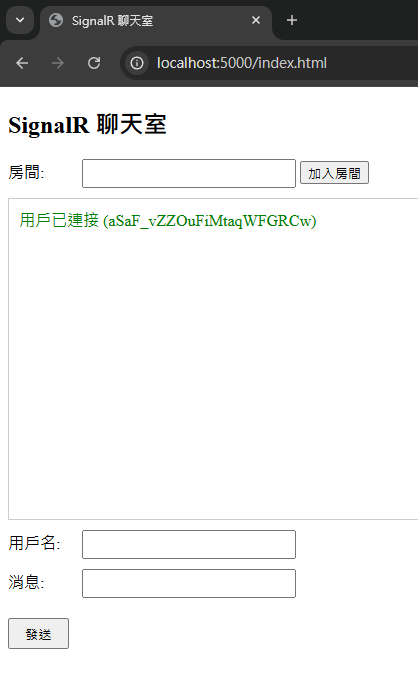
如果 Anthea 進入到房間(明星三缺一),這時候他的訊息只會發給同一個房間裡的人,沒有進入同一個房間的 Ensui 就收不到訊息了: